Creating a resilient test framework with the Playwright Page Object Model (POM)
Implement the Playwright Page Object Model (POM) to build maintainable, resilient test suites by centralizing page interactions and separating them from test logic.

Introduction
The Page Object Model (POM) establishes a clear design pattern for test automation codebases. If you have some coding experience, are in the process of creating a test automation framework, or have muddled your way through countless files of unreadable code and are looking for a better way, POM may be for you. And this article is here to help.
What is the POM?
POM is a clean code design pattern for test automation architecture. An easy way to think about it is this: the Tests test, the Page acts.
More specifically, the Test controls the flow and asserts the state of the application. The Page handles the actions to navigate that flow and report on the state.
- A Test says ‘select this button’
- The Page selects the button
- Then the Test asserts ‘did the dialog appear?’
- The Page retrieves the dialog
Another advantage is that your test code uses a common, reusable library of page classes. By centralizing selectors and actions in a common class file, test code becomes easier to maintain and less fragile. You’ll likely find even more reusable functions that you may want to move into helper classes or put into the global Page class.
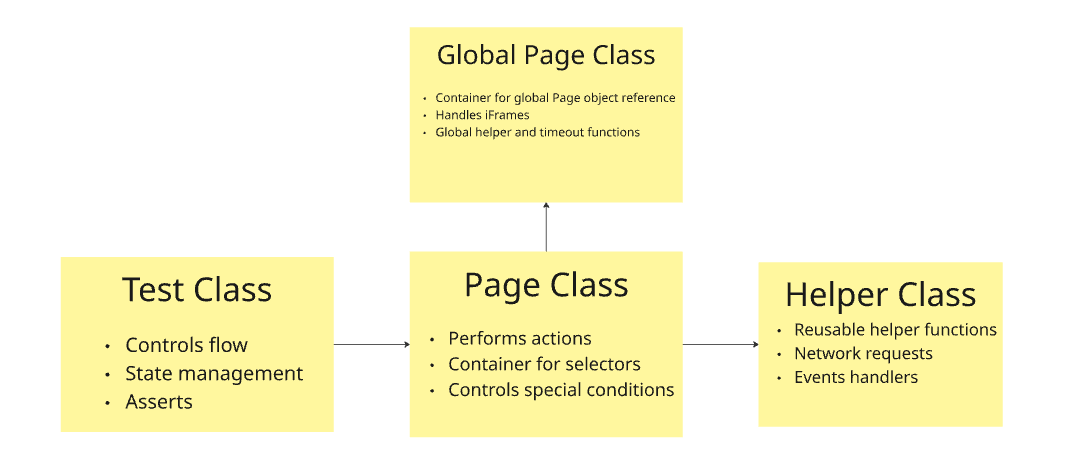
The diagram above lays out the POM architecture:
-
Test Class
- Controls flow
- State management
- Asserts
-
Global Page Class
- Container for global page object reference
- Handles iFrames
- Global helper and timeout functions
-
Page Class
- Performs Actions
- Container for selectors
- Controls special conditions
-
Helper Class
- Reusable helper functions
- Network requests
- Events handlers
The origins of POM
The POM is a well-established pattern and best practice of test automation frameworks. It was built as a solution to the challenges of scaling and maintaining large test automation frameworks.
In bygone eras, test automation was written on a test-by-test basis, with little supporting framework or architecture. Each test contained hard-coded selectors, custom action logic, timeouts, and anything else required to make the test run. Tests looked very much like those in Playwright’s example documentation:
test('get started link', async ({ page }) => {
      await page.goto('https://playwright.dev/');

      // Click the get started link.
      await page.getByRole('link', { name: 'Get started' }).click();

      // Expects page to have a heading with the name of Installation.
      await expect(page.getByRole('heading', { name: 'Installation' })).toBeVisible();
});
Written this way, each test controls its own selectors and actions. This doesn't scale well. Imagine that you have dozens of tests all of which need to select the ‘Get started’ link. Now imagine someone updates the product and ‘Get started’ is changed to ‘Click Here!’. Dozens of tests would fail, and you’d need to go into each test and update the locator to the new text.
This presents a maintenance nightmare. Each test has to be maintained almost as a separate codebase, each with its own custom logic needing to be tweaked and updated. A change to the product means changing dozens of tests.
Eventually, clean code architecture and the General Responsibility Assignment Software Principles (GRASP) caught up to test automation. Best practices were established, including:
- DRY (don't repeat yourself) means creating functions that perform specific actions and that can be reused across many tests.
- SOLID principles advise the creation of class objects that contain all things required to interact with a section of the product (a page) as well as a division between tests that 'assert' and pages that 'act.'
- KISS (keep it short and simple) prescribes standards for easily readable code: all procedures must be self-evident within the function.
With these principles in place, an intentional change to the product logic means a simple update to a class definition. Automated tests can now scale effectively to large systems. Tests are more stable. Logic changes are centralized. New functionality can be built on top rather than on the side.
We call this collection of best practices as it applies to test automation the Page Object Model (POM). The system under test is modeled using classes called Pages in an Object-oriented design pattern.
To apply this to the above example, we can create a central ‘HomePage’ that contains all the actions and selectors. This way, any changes to the product need to be reflected only within HomePage:
test('get started link', async ({ page }) => {
      const home_page = new HomePage(page);

      await home_page.goto();

      // Click the get started link.
      await home_page.clickGetStarted();

      // Expects page to have a heading with the name of Installation.
      await expect(home_page.header).toBeVisible();
});
Don't read the Playwright docs (for POM, anyway): approaching POM a better way
Playwright’s documented best practices do not account for use of POM. In fact, several best practices are actually anti-patterns for POM.
- Playwright's auto-retrying assertions require that selectors be placed in the test itself.
- Playwright’s recommended Locators often mix assertion logic with selector logic.
- Playwright recommends that network requests and events should be handled within the test itself, and requires establishing capture functions before the triggering event.
At the time of this writing, Playwright's documentation does have an example of POM. It is not only terse but actually fails to use the POM correctly in its example code. It places page.locator inside the test case (mixing page logic in the test), modifies locators inside of functions (locators should be statically defined), and instantiates locators in the constructor (locators should be part of the class definition for code completion capabilities).
Let's create a better architected example.
Playwright is an excellent modern tool, and POM still solves many framework challenges in test automation. We can unify the tool with the framework for the best of both and for everyone's sanity.
Examples are included below. The complete codebase can be found in Github: https://github.com/owlfeatherautomation/POM-DEMO
Finding the Pages in Playwright's website
For this example, we’ll use Playwright.dev, Playwrights homepage. There is no strict definition when it comes to what constitutes a ‘page.’ The general rule is encapsulation and reuse.
With that in mind, I broke down Playwright's home page into three components to be used in this example:
- home_page.ts: contains all content on the page
- header_page.ts: as the Header is reused across all pages, home_page can contain a reference to header_page for reuse of Header functions
- search_dialog_page.ts: like Header, Search is across all pages. It opens a dialog overlay that is independent of the governing page
There are other ways of breaking down this page, as well as other pages we could create (such as footer_page.ts). But for this example, this is good enough.
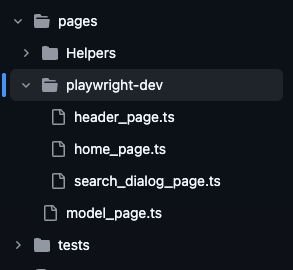
The image above shows the page folder structure with header_page, home_page, and search_dialog_page.
Creating a model Page
Let’s start by creating a proper Page object constructor. In older frameworks, we would extend or otherwise overwrite the global 'Page Class' or its nearest approximation. However, the global 'Page' object in Playwright cannot (or perhaps simply should not) be interfered with.
Instead, we'll create our own parent class that all our child Page classes will extend.
This class will do three things:
- First, it will encapsulate the global Page object, giving all child classes access to all Page functions
- Second, it will allow us to use better intellisense when referencing and refactoring our selectors.
- Third, it can contain 'global' helper functions that many child classes may need. It is common to have some global waitForTimeout procedures, for example.
// model_page.ts
import { FrameLocator, Page } from "@playwright/test";

export class Model_Page {
      readonly page: Page;
      readonly iFrame: FrameLocator | Page;

      constructor(page: Page, iFrame?: FrameLocator | Page) {
            this.page = page;
            this.iFrame = iFrame;

            if (!iFrame) {
                  this.iFrame = page;
            }
      }
}
Creating a Page class with static locators
Now we can create a Page Class. All page classes should extend Model_Page, and that requires a call to super() to create that object.
Since the super object is assumed to have already been created, Typescript allows us to use the global Page object when establishing constant variables as part of the class definition. We no longer need to write a long list of read-only variables that are then set to locators in the constructor.
This way, when we reference a variable, code completion will be able to show us better information:
- On hover it will show the actual Locator used
- On F12 it will take you right to the definition, no scrolling through the constructor required
Our home_page class is very basic. It contains the logic to navigate directly to the URL, as well as a selector for the Get Started button.
Since the Header is universally applied across the website, we can create an instance of that page class here for use.
// home_page.ts

import { Model_Page } from "@pages/model_page";
import { FrameLocator, Page } from "@playwright/test";
import { Header_Page } from "./header_page";

export class Home_Page extends Model_Page {
      readonly HEADER: Header_Page;
      readonly GET_STARTED_BUTTON = this.page.getByRole("link", {
            name: "Get started",
      });

      constructor(page: Page, iFrame?: FrameLocator | Page) {
            super(page, iFrame);

            this.HEADER = new Header_Page(this.page, this.iFrame);
      }

      async gotoHome(): Promise<Home_Page> {
            await this.page.goto("/");

            return this;
      }
}
Using this, we could create a very basic test that opens the page and asserts the Get Started button.
// home_basic_tests.spec.ts

import { Home_Page } from "@pages/playwright-dev/home_page";
import { expect, test } from "@playwright/test";

test("Basic Home Page Test", { tag: ["@e2e", "@home"] }, async ({ page }) => {
      const home_page = new Home_Page(page);

      await home_page.gotoHome();

      expect(home_page.GET_STARTED_BUTTON).toHaveAttribute("href", "/docs/intro");
});
Adding actions to the Page class
POM requires that we encapsulate actions inside functions. This allows us to handle any special conditions before or after our required action. Selecting a button may be simple, but there may be other considerations we need to account for.
We can see an example by including the Header. The Header has lots of functions. We want to:
- Access the title
- See all languages and navigate
- Open the Search Dialog
Let’s look at the Languages dropdown menu. The dropdown actually uses a hover event. Without POM, any test that needed to interact with this dropdown would have to go through each of those steps. But with POM, we can define functions that automatically hover, wait for the dropdown to display, and then perform our action.
// header_page.ts

async allLanguages(): Promise<string[]> {
	await this.LANGUAGE_DROPDOWN.hover();

	return await this.LANGUAGE_DROPDOWN_LINK_LIST.allInnerTexts();
}

async getCurrentLanguage(): Promise<string> {
    await this.LANGUAGE_DROPDOWN.hover();
    await expect.soft(this.LANGUAGE_DROPDOWN_CURRENT_ITEM).toBeVisible();
	return await this.LANGUAGE_DROPDOWN_CURRENT_ITEM.innerText();
}

async clickLanguage(env: Languages): Promise<void> {
    await this.LANGUAGE_DROPDOWN.hover();
    await expect.soft(this.LANGUAGE_DROPDOWN_CURRENT_ITEM).toBeVisible();
	await this.LANGUAGE_DROPDOWN_LINK_LIST.getByText(env).click();
}
Note: there is a soft assertion inside the header_page.ts above. Soft asserts allow for checking for state, but if they fail, the test still continues to run. This reduces the need for hard-coded waitForTimeout calls while keeping the hard assertions inside the tests.
At this point, our test becomes quite simple to read:
// home_tests.spec.ts

test("Supported Languages", { tag: ["@e2e", "@home"] }, async ({ page }) => {
	const header = home_page.HEADER;
	expect(await header.getCurrentLanguage()).toBe(Languages.NODEJS);
	expect(home_page.GET_STARTED_BUTTON).toHaveAttribute("href", "/docs/intro");

	await header.clickLanguage(Languages.PYTHON);
	await expect(home_page.HEADER.HEADER).toHaveText("Playwright for Python");

	expect(await header.getCurrentLanguage()).toBe(Languages.PYTHON);
	expect(home_page.GET_STARTED_BUTTON).toHaveAttribute(
		"href",
		"/python/docs/intro"
    );
});
What we do NOT do in the page class is anything that can be handled with Playwright's auto-retrying assertions! No more isButtonVisible() functions! This should be done in the test case itself using the Locator variable.
// home_tests.spec.ts

test(
	"Open/Close Search",
	{ tag: ["@e2e", "@home", "@search"] },
	async ({ page }) => {
		const search_dialog = await home_page.HEADER.openSearchPage();

		await expect(search_dialog.DIALOG).toBeVisible();
		await search_dialog.escSearch();
		await expect(search_dialog.DIALOG).not.toBeVisible();
	}
);
Handling routes in Page classes
Now we turn to the Search page. The Search functionality makes network requests to find the search results.
Part of Playwright's best practices, and indeed one of its best features, is how cleanly it handles and captures network requests. This allows for a deeper level of testing than simply checking the UI and it also gives you better control of the system state.
There is one big caveat to their use: you need to establish the route handler (the function that captures the request and response) before the triggering event is called. The preferred way of doing this is with a Promise.all([]) that wraps both the handler and the triggering event.
In POM, the triggering event is the function itself: clickButton(). What we want to avoid is pasting our route handler into every clickButton() function that captures the same route.
To do this, we can use Typescript's lambda functions and anonymous functions. Typescript functions have the ability to take a function as a parameter. We can establish a reusable anonymous function that takes in a 'trigger' and wraps the generic route handler with the lambda trigger in a Promise.all. With this, we can reuse this route with any trigger across our page classes without breaking POM encapsulation principles.
Once the route is complete, we can either return the Response object (for assertion) or we can save the Response object as a class level variable. Note: we must import Response from Playwright! If you use the standard Node Response (which is what your IDE will default to), you'll receive type errors.
// network_request_handler.ts
import { Page, Response } from "@playwright/test";

export type Fulfill = {
	status?: number;
	headers?: {};
	body?: string;
};

export const captureQueries = async (
	page: Page,
	trigger: Promise<void>
): Promise<Response> => {
	const [response] = await Promise.all([
		page.waitForResponse(
			(response) =>
				response.url().includes("/queries") && response.request().method() === "POST"
            ),
            trigger,
	]);

	return response;
};

export const fulfillQueries = async (
	page: Page,
	trigger: Promise<void>,
	fulfillment: Fulfill
): Promise<void> => {
	const [response] = await Promise.all([
		page.route("**/queries", (route) => route.fulfill(fulfillment)),
		trigger,
	]);
};
// search_dialog_page.ts
async enterSearch(text: string): Promise<Response> {
return await captureQueries(this.page, this.SEARCH_INPUT.fill(text));
}
async enterSearchAndMockFail(text: string): Promise<void> {
await fulfillQueries(this.page, this.SEARCH_INPUT.fill(text), {
status: 400,
});
}// search_tests.spec.ts
test("Search Results", { tag: ["@e2e", "@search"] }, async ({ page }) => {
const search_dialog = await home_page.HEADER.openSearchPage();
await expect(search_dialog.DIALOG).toBeVisible();
const response = await search_dialog.enterSearch("test");
expect(response.status()).toBe(200);
await expect(search_dialog.RESULTS_LIST).toBeVisible();
});
test(
"Search Results Invalid",
{ tag: ["@e2e", "@search"] },
async ({ page }) => {
const search_dialog = await home_page.HEADER.openSearchPage();
await expect(search_dialog.DIALOG).toBeVisible();
const response = await search_dialog.enterSearchAndMockFail("test");
await expect(search_dialog.RESULTS_LIST).toBeHidden();
}
);Handling events in Page classes
Similar to Routes above, Playwright has some clean built-in handlers for browser-level events. And they come with the same issue and the same solution: the need to establish the handler before the trigger.
Unlike Response, events do not return a clean object. Instead, we'll establish our own Type which can be built out based on our needs. We then return an object of that type which is treated the same as the Response object for assertions.
Unfortunately, Playwright.dev does not have any events I could find, but an example of how to structure such a class is shown below:
// event_handler.ts
import { Page } from "@playwright/test";

export type Popup = {
	message: String;
};

export const getPopupAndDismiss = async (
	page: Page,
	trigger: Promise<void>
): Promise<Popup> => {
	let message = "";
	await Promise.all([
		page.once("dialog", async (dialog) => {
			message = dialog.message();
			await dialog.dismiss();
		}),
		page.waitForEvent("dialog"),
		trigger,
	]);

	return { message: message };
};


export const getPopupAndAccept = async (
	page: Page,
	trigger: Promise<void>
): Promise<Popup> => {
	let message = "";
	await Promise.all([
		page.once("dialog", async (dialog) => {
			message = dialog.message();
			await dialog.accept();
		}),
		page.waitForEvent("dialog"),
		trigger,
	]);

	return { message: message };
};
To wrap up: the lasting resilience of POM
POM solves the challenges of test automation at-scale. Once your test suite grows into the dozens or hundreds, POM keeps your tests maintainable.
- Centralizing selectors and actions into common page classes means that automated tests can be easily updated when the product changes.
- Keeping assertions inside the tests and strictly controlling flow ensures that we are always testing intentionally.
- Leveraging lambda and anonymous functions for triggers makes deeper levels of testing easily accessible.
Playwright is an exciting new tool for test automation. POM is an established design pattern for automation frameworks in any tool. By applying these learned lessons of the past forward into our use of more modern tools like Playwright, we can continue to build more resilient test automation well into the future.
What do YOU think?
Got comments or thoughts? Share them in the comments box below. If you like, use the ideas below as starting points for reflection and discussion.
Questions to discuss
- When you encountered your first test automation code, what difficulties did you encounter?
- Does POM solve any of your current automation pain points?
- Can POM be used for easier onboarding of new quality engineers or help draw in developers?
- How can POM be used in a test-driven-development methodology?
Actions to take
- Talk to your team and learn the pain points of your current test automation.
- Review your current automated tests. Is there a lot of repetitive code that you could centralize into function calls?
- If you have flakey test failures, audit them for special logic like timeouts. Timeout functionality can usually benefit from a POM structure.
- POM makes network handling easy. Consider adding routes to your test coverage.
For more information
- Enhancing the Page Object Model to Support Dynamic Languages, Ray Rahat
- Simple Playwright authentication recipes: A cookbook for software testers, Swathika Visagn
- Pair Programming with AI: My Playwright Testing Journey, Christine Pinto

The answer to quality is context.
Comments