When AI maintains your tests: Designing safe self-healing automation
Locator maintenance is the hidden tax of UI automation
UI (User Interface) testing failures are often not production bugs but broken locators. And at scale, fixing them becomes a constant maintenance loop. Teams end up spending more time stabilising tests than validating real issues. Over time, this doesn’t just slow things down. It also erodes trust in automation.
In this article, I’ll walk through how AI-assisted self-healing can reduce that burden without turning automation into a black box. The focus is not just on using AI, but on designing it as a controlled fallback so the system remains predictable and safe.
I’ve seen teams spend more time debugging test failures than investigating issues. That shift is subtle, but it changes the value automation delivers.
Locator maintenance is at the centre of this problem. Locators (expressions used to uniquely identify a UI element), such as a button, an input field, or a label, are one of the core building blocks of UI automation. Automation frameworks such as Appium, Espresso, and XCUITest rely on these locators to locate and interact with UI elements during test execution. Every action depends on the accuracy of these locators.
The challenge is that locators are tightly coupled with the UI. Even a small change, such as a renamed label, can break the locator. When that happens, tests fail because the automation can no longer find the element.
If you run mobile automation at scale, the cycle probably looks familiar:
- A test fails with an “element not found” exception
- Engineers analyse logs and trace the issue to a locator change
- The locator is updated in the automation codebase
- The test passes again
- The cycle repeats
As test suites grow and as products evolve, this becomes a continuous maintenance burden. A single change can break dozens of tests at once. Over time, this slows teams down and reduces confidence. This is why many teams are exploring self-healing automation, in which tests automatically recover from locator failures using context and AI.
The idea is simple but powerful. When a test fails due to a locator change, the system intelligently identifies the correct element and continues execution, reducing intervention and improving resilience.
Before diving into architecture, it’s worth asking a simple question. If AI can identify UI elements, why not let it drive the entire automation flow? The answer lies in reliability. Deterministic automation is predictable, easy to debug and makes failure easy to diagnose. AI, on the other hand, is probabilistic and can occasionally make confident but incorrect decisions. Rather than replacing deterministic automation, the safer approach is to use AI only when the original locator fails. This preserves the strengths of traditional automation while adding the capability to recover from UI changes when needed.
Architecture of the locator healing system
The most important design decision is that:
AI should be the fallback (a recovery path triggered only when the original locator fails), not the primary automation system.
Instead of relying on AI to identify elements, we use it only when the original locator defined deterministically in the automation code fails. This keeps the system predictable, easy to debug, and safe. This design introduces a controlled recovery mechanism that activates only under specific failure conditions.
System overview
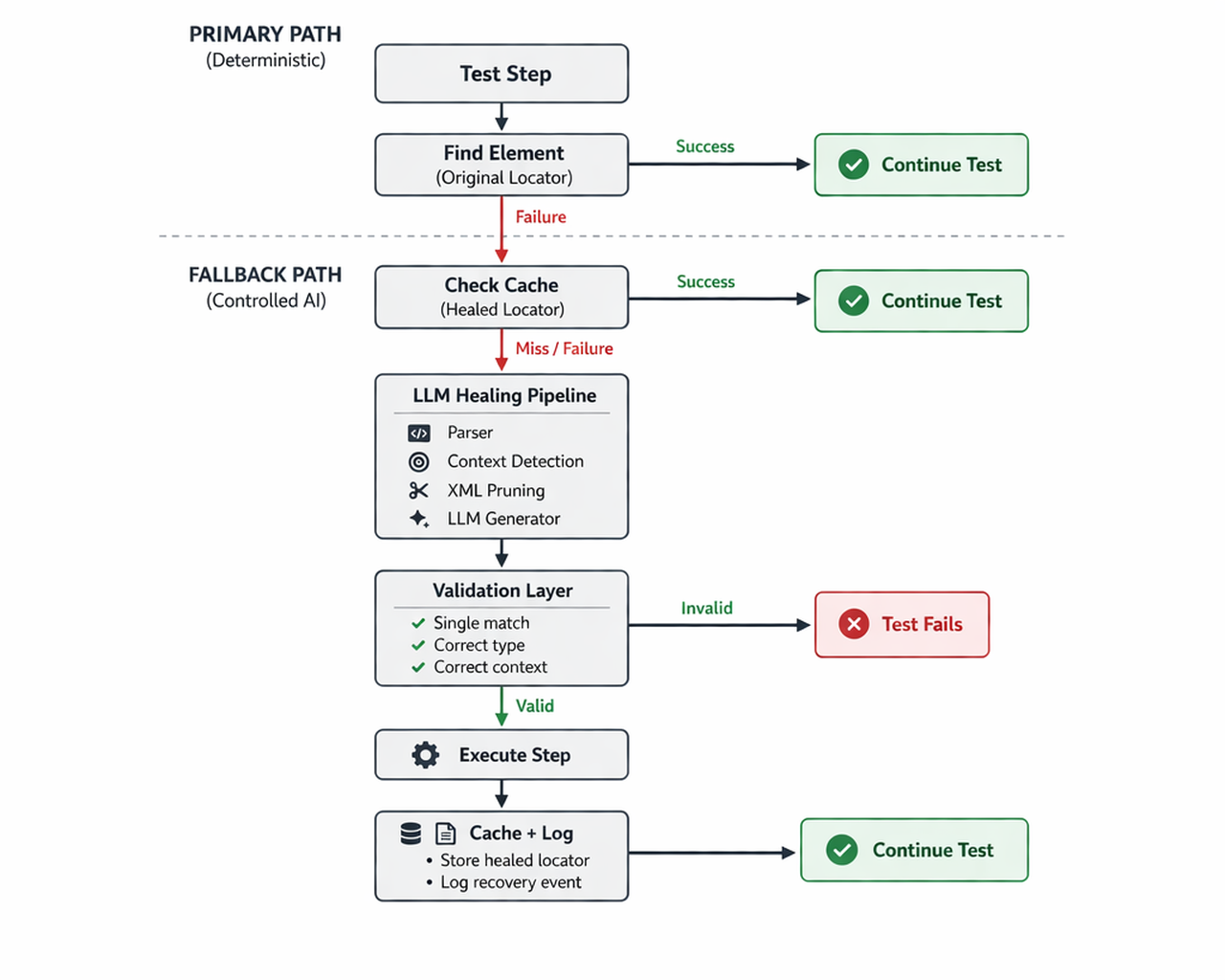
Core components of the healing system
At the high level, the system operates as a layered pipeline with two distinct paths. A deterministic (rule-based and predictable) primary path and a controlled AI fallback path. This separation helped preserve reliability while introducing adaptability, but only when needed.
Primary path (Deterministic execution)
Every test step starts with the standard flow, where the framework tries to locate the element using the locator in the codebase. If the element is found, the test execution proceeds. It is the same as a traditional automation setup.
If needed, this functionality is fully deterministic, making failures easy to understand and debug. It also ensures consistent performance, as no additional processing is needed. The key idea here is that AI should not interfere with a system that is functioning correctly.
Fallback path (Controlled AI recovery)
When the original locator fails (e.g. NoSuchElementException), the system transitions into a controlled recovery mode. Unlike traditional retries or heuristic-based approaches, this path is designed as a structured pipeline in which each step reduces uncertainty before moving to the next.
Check cache
The first step in the fallback path is a cache lookup. Before invoking the AI, the system checks whether a previously healed locator exists for the same element. If a valid cached locator is found, it is reused, and the test continues. This keeps the recovery path efficient. If no cached locator is available or if the cached locator is no longer valid, the system moves to the healing pipeline.
Introducing cache at this stage ensures that repeated failures caused by the same UI change are handled quickly. Over time, this creates a stabilisation layer in which common breakages are resolved without involving AI. The mechanics of how locators are cached and reused are discussed later in the article.
LLM healing pipeline
If the cache does not provide a valid locator, the system invokes the LLM-based healing pipeline. This multi-stage process is designed to turn a failure into a more constrained decision problem.
Locator parser
The first step is to extract structured signals (explicit attributes like text, type, action, and context) derived from the failing locator and its usage. Instead of relying on vague instructions, the system analyses both the locator definition in the automation codebase and its use in the test. This allows it to derive attributes such as element text, class type, intended action, and contextual hints from naming conventions. The goal of the parser is not to interpret the UI, but to make the intent of the test explicit.
Locator definition example:
CHECKOUT_CONTINUE_BUTTON = {
    "by": "xpath",
    "value": "//android.widget.Button[@text='Continue']"
}
Locator usage example:
click(CHECKOUT_CONTINUE_BUTTONParsed attributes example:
parsed = {
    "text": "Continue",                   # from locator value
    "class": "android.widget.Button",     # from locator value
    "action": "click",                    # inferred from usage
    "context": "checkout",                # from variable name
    "element_type": "button"              # from variable name
}
Context detection
Even with accurate signals, ambiguity can still exist. The same element may appear on multiple screens, and selecting the wrong one can lead to incorrect test behaviour.
A common example is a “Continue” button appearing in both the alert (foreground) and the background view. Without context, both are valid matches.
To address this, context (where the element appears in the user flow, such as a screen or a feature) is embedded directly into the signals passed to the model. This context is derived from the locator variable names, test flow, and screen-level semantics. By incorporating this information early, the system ensures that the model operates within the correct scope of the user journey. This step is critical in preventing what can be described as “correct but wrong” matches.
XML pruning (reducing the UI hierarchy to only relevant elements)
Mobile UI hierarchies are often large and noisy, sometimes containing hundreds of elements. Passing the entire structure to the model increases latency, cost and the likelihood of incorrect matches.
To mitigate this, the system reduces the UI hierarchy to a smaller relevant subset before passing it to the model. This process filters elements based on the extracted signals, such as matching text and element type, while preserving enough structural context to maintain the meaning.
By narrowing the search space, XML pruning improves both the efficiency and accuracy of the model’s output. The model is no longer searching across the entire screen, but only among a small set of likely candidates.
Before pruning:
<Screen>
<Text>Welcome</Text>
<Button text="Continue"/>
<Input text="Search"/>
<Button text="Cancel"/>
</Screen>
After pruning:
<Screen>
<Button text="Continue"/>
</Screen>
Example implementation
def prune_xml(xml_tree, signals):
    candidates = []

    for node in xml_tree:
        if signals["text"].lower() in node.text.lower():
            if node.class_name in ["Button", "TextView"]:
              candidates.append(node)

    return candidates[:5]
LLM generator
With structured signals and a pruned UI hierarchy, the system invokes the model to generate a locator. The model is not given open-ended instructions. Instead, it operates under explicit constraints where the element must match the intended action, align with the expected type, and belong to the correct context. It is also encouraged to prefer stable attributes over brittle ones.
If no element satisfies these constraints, the model is expected to return an empty result rather than guessing. This constraint-driven approach means the model behaves predictably.
Example prompt
You are an expert in UI automation.

Goal:
Identify the correct element and return a locator.

Inputs:
- Parsed attributes from failing locator
- Action type
- Context information
- UI hierarchy (pruned)

Constraints:
- Element must match semantic intent
- Element must match action type
- Element must belong to the correct context
- Prefer stable attributes

Rejection Rules:
- Reject invalid or ambiguous matches
- Return EMPTY if no valid match exists

Output:
Return a single locator or EMPTY
Validation layer
Any locator generated by the model must pass through a strict validation layer (a set of checks ensuring the locator is safe, unique and actionable) before it is used. This step ensures that the locator resolves to exactly one element, matches the expected interaction type and is valid within the current UI state. For example, a locator intended for a click action must resolve to a visible and clickable element.
The validation layer acts as the final safety gate. Even if the model produces a plausible locator, it will not be used unless it satisfies all validation criteria. Separating generation from validation is important. The model proposes a locator, but the system decides whether it is safe to use.
Example validation
def validate(locator):
    elements = driver.find_all(locator)

    if len(elements) != 1:
        return False

    element = elements[0]

    if not element.is_displayed():
        return False

    if action == "click" and not element.is_clickable():
        return False

    return True
Execute step
Once a locator passes validation, the test step is executed using the healed locator. At this stage, the system attempts to proceed using the best available candidate identified by the pipeline. While validation increases confidence, it does not guarantee success. The interaction may still fail due to UI behaviour, a timing issue, or something simple like incomplete context.
This step marks the transition from locator selection to actual execution, where the system verifies whether the healed locator holds up in a real interaction scenario.
Cache and log
If the execution step succeeds, the healed locator is stored in a cache for future reuse. This allows the system to bypass the AI pipeline for similar failures in subsequent runs or steps, resolving them immediately with minimal overhead.
However, caching is not just an optimisation mechanism. It also acts as a memory layer that captures how the system adapts to UI changes over time. Repeated failures caused by the same UI updates can be handled consistently without reprocessing, improving both stability and performance.
In parallel, every recovery attempt is logged. This includes the original failing locator, the healed locator, the contextual signals used and the outcome of the execution. These logs provide visibility into when and where healing occurs and whether those recoveries are reliable.
At this point, an important question arises. ‘What should be done with healed locators beyond runtime usage?’ In practice, we explored multiple approaches depending on the level of trust in the system and the desired balance between safety and automation.
In practice, teams usually start with runtime-only healing, where the healed locator is used strictly during execution and never written back to the codebase. All recoveries are logged for later inspection, but no automatic updates are made. This is the safest option, as it keeps full control in the hands of engineers while still reducing test failures during execution.
From there, some introduce human-reviewed updates, typically through pull requests. Engineers review the proposed locator update to validate it and merge it into the repository. This creates a controlled loop where AI assists with maintenance, but humans make the final decisions.
A fully automated approach is auto-merge, in which the fixed locators are put back into the codebase without review. This can significantly reduce effort, but it also introduces risk. Even with strong validation, incorrect updates can quickly get out of hand. In practice, this approach only works when our confidence is high enough, and those safeguards are also in place.
Each of these approaches comes with tradeoffs between safety, speed, and autonomy. Teams tend to start with runtime-only healing, gradually move toward human-reviewed updates, and treat auto-merge as an advanced optimization rather than a default strategy.
Over time, this combination of caching, logging, and controlled updates allows the system to evolve from reactive recovery to a more stable and continuously improving automation framework.
Limitations and trade-offs of AI-assisted healing
Even with constrained prompting and validation layers, the system has some clear limitations and trade-offs.
One of the most common challenges is a limited understanding of intent. When multiple elements share similar attributes, I’ve seen cases where everything looked correct on paper, but the test ended up clicking the wrong thing entirely.
Another area of difficulty is handling complex locator structures. Locators are not simple attribute matches. They depend on hierarchical relationships, such as parent-child or sibling positioning in deeply nested views. Reconstructing these relationships from a pruned UI hierarchy is inherently difficult, and the model may struggle to generate stable locators in such cases.
Prompt brittleness is another recurring issue. Small changes to prompt rules can have unintended consequences. Improvements made for one scenario can affect another, making it difficult to design a single prompt that performs consistently across all contexts.
Performance and cost are also considerations. Invoking the model frequently can introduce latency into test execution and increase infrastructure costs. While caching helps mitigate this, it does not eliminate the need for control over when and how the model is used.
These limitations reinforce an important design principle.
AI should not replace deterministic automation but complement it
Keeping AI as a controlled fallback ensures that failures are contained and predictable.
A real-world moment
One particular incident made this tradeoff very clear.
In a single run, a small UI change renaming a button from “Continue” to “Next” caused over forty tests to fail. The healing system automatically recovered most of them, successfully identified the updated element, and continued execution.
However, a small subset of tests still failed. On closer inspection, the issue was not with the model’s ability to find matching elements, but with its ability to choose the correct one. In these cases, it selected elements from a different flow with similar labels. This highlighted a deeper insight. The problem was not model capability, but lack of sufficient context.
That moment shifted the system's focus. Instead of trying to improve model intelligence in isolation, we prioritised strengthening contextual signals and constraints. The outcome was a more reliable system, not because the model became smarter, but because the problem it was solving became better defined.
Key lessons learned
Building this system reinforced a set of principles that go beyond locator healing and apply more broadly to AI-assisted engineering systems. This sounds obvious in hindsight, but it took a few failures to fully appreciate it.
- AI works best as a fallback rather than a replacement: Deterministic automation provides stability, predictability, and clear failure modes. Introducing AI as a secondary path allows the system to recover from change without compromising these foundational properties.
- Context matters more than model capability: Early attempts focused on improving prompts and model responses, but the biggest gains came from providing better contextual signals. When the problem is well-defined, even simple models perform reliably. Without context, even advanced models can produce technically correct but functionally incorrect outcomes.
- Structured signals reduced ambiguity: Structured signals play a central role by converting implicit information such as element intent, interaction type, and screen context into explicit inputs. The system reduces ambiguity and guides the model toward more accurate decisions. This shifts the problem from open-ended interpretation to something much more constrained.
- Prompt engineering requires software engineering discipline: The experience also revealed that prompt design behaves much like software development. Prompts are not static instructions, but evolving artefacts that introduce trade-offs with every change. Improving one scenario can degrade another, making it necessary to treat prompts with the same discipline as production code. Versioning, evaluation against failure cases, and regression validation become essential to maintaining consistent behavior over time.
- Validation layers are essential: AI-generated outputs cannot be trusted blindly, regardless of how well the model performs. Separating generation from execution ensures that only safe and verifiable outcomes are acted upon, preventing incorrect recoveries from propagating through the system.
- Transparency builds trust: Logging recovery decisions, exposing how locators were generated, and enabling review workflows allow engineers to understand and validate the system’s behaviour. Without this visibility, even accurate systems can be difficult to adopt in practice.
- Successful AI systems depend on system design: Together, these lessons highlight a broader pattern in which successful AI systems are not defined by model capability alone, but by how well they are integrated, constrained, and governed within the overall system design.
What’s next for self-healing automation?
While the current system provides a practical and controlled approach to locator healing, there are several opportunities to make it more reliable, efficient and scalable as AI-assisted testing continues to evolve.
- Element-specific prompting can improve accuracy: One direction is moving beyond a single generalized prompt. In practice, different elements behave differently. Different element types, such as buttons, input fields, and views, don’t all need the same rules. Applying element-specific constraints can reduce a lot of the ambiguity and improve locator generation.
- Prompt regression testing will become essential: As prompts evolve, maintaining consistency across different scenarios becomes increasingly challenging. Improvements in one scenario quietly break another. Treating prompts like code with validation against real failure cases becomes necessary at scale.
- Validation should verify outcomes, not just interactions: Most systems check structure, such as whether the element exists, whether it is clickable, and whether it is visible. But that’s not always enough. A locator can pass all checks and still be wrong in the context of the flow. Verifying the outcome of an interaction, rather than just the interaction itself, provides greater confidence that the recovery was successful.
- Richer context will enable better decisions: Simple screens are relatively easy to heal, but real applications often contain multiple elements with similar attributes. Incorporating richer contextual information such as user flow, the expected screen can significantly reduce incorrect matches and improve recovery accuracy.
To sum up
AI-assisted self-healing is not about replacing deterministic automation with AI. It is about combining the strengths of both. Deterministic automation provides reliability, predictability and clear failure behavior. While AI introduces adaptability when the application changes.
The most effective systems treat AI as a controlled fallback, validate every AI-generated decision before execution and make the recovery process transparent to engineers. Ultimately, the success of these systems depends less on model capabilities than on thoughtful system design that balances adaptability, safety, and trust.
What do YOU think?
Got comments or thoughts? Share them in the comments box below. If you like, use the ideas below as starting points for reflection and discussion.
- Would you trust AI to update locators in your test suite?
- How much validation is enough before accepting an AI-generated fix?
- Where should the boundary lie between automation and human oversight?
- If you’ve experimented with similar approaches, what worked and what didn’t?
For more information

Quality Engineering leader with 15+ years driving large scale mobile/web automation. Known for improving CI reliability, reducing flakiness, and advancing AI assisted testing practices across teams.
Comments