Exploring My Reports
20 Feb 2026
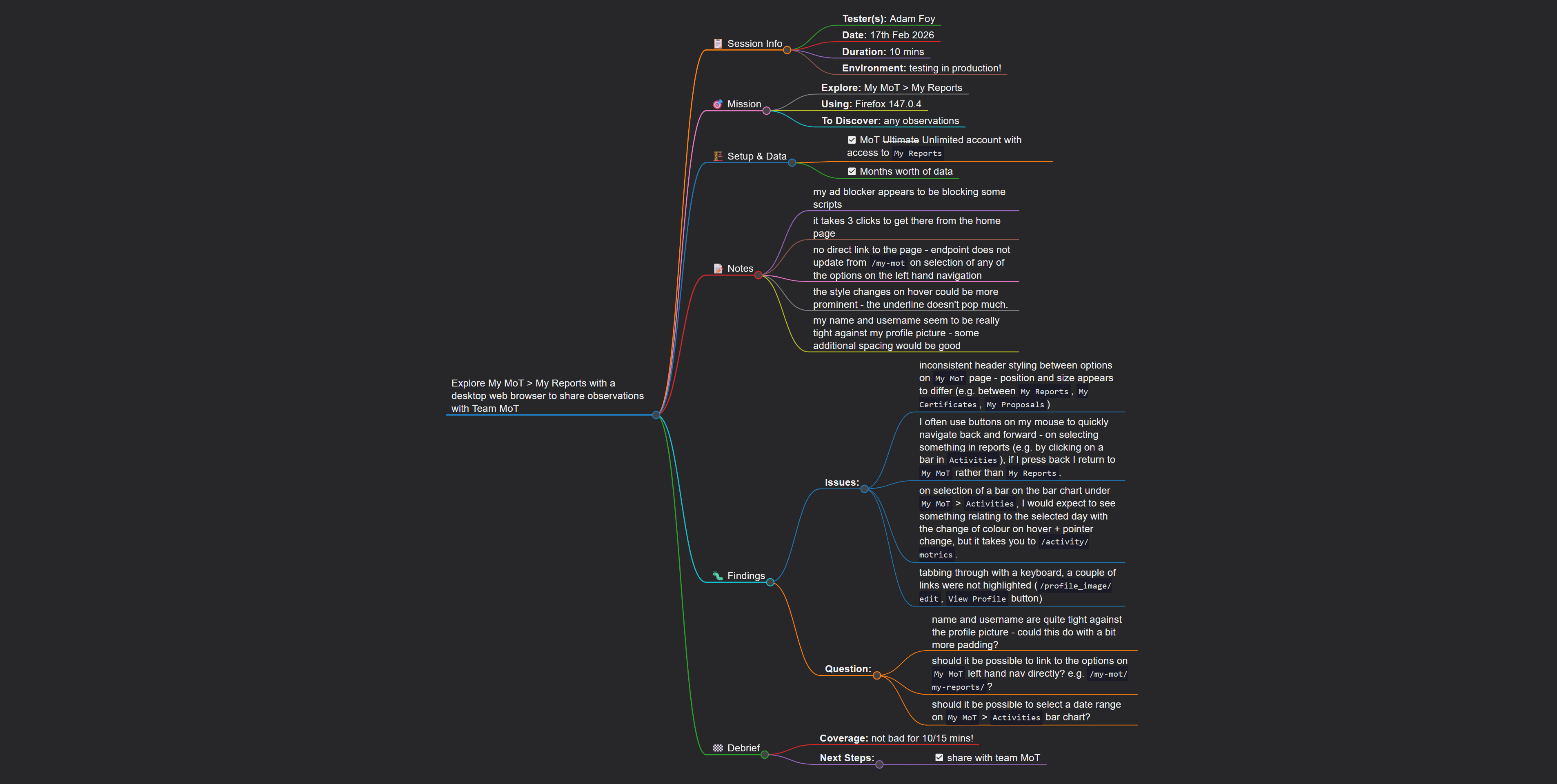
In this moment:
Simon Tomes
Simon recently sent out a challenge to spend ten minutes exploring the MoT My Reports page. It seemed like a good excuse to try out my new exploratory testing template, so I decided to give it a go.
I used Markmap to create the mind map in the image. Markmap is a tool that converts Markdown into a mind map, where each header or list item is turned into a node in the mind map. I'm a big fan of it as you don't need to worry about awkwardly connecting things up through a UI, and it's much easier to restructure if you decide to move things around (which is something I do constantly 🫠). There's a nice export function in the VS Code plugin where you can export as HTML, to share with others who aren't set up to open the raw Markdown in VS Code.
I feel like it worked pretty well, but trying to shoehorn all findings under Issues and Questions was a bit limiting. I've updated the template to use PQIP instead, which will hopefully make things clearer next time I use it. Here's the new template if anyone wants to try it out:
I used Markmap to create the mind map in the image. Markmap is a tool that converts Markdown into a mind map, where each header or list item is turned into a node in the mind map. I'm a big fan of it as you don't need to worry about awkwardly connecting things up through a UI, and it's much easier to restructure if you decide to move things around (which is something I do constantly 🫠). There's a nice export function in the VS Code plugin where you can export as HTML, to share with others who aren't set up to open the raw Markdown in VS Code.
I feel like it worked pretty well, but trying to shoehorn all findings under Issues and Questions was a bit limiting. I've updated the template to use PQIP instead, which will hopefully make things clearer next time I use it. Here's the new template if anyone wants to try it out:
---
markmap:
    colorFreezeLevel: 3
    maxWidth: 320
    initialExpandLevel: 2
    activeNode: center
---
# [exploratory testing charter name]

## 📋 Session Info
- **Tester(s):** [name(s)]
- **Date:** [YYYY-MM-DD]
- **Duration:** [30 / 60 / 90 mins]
- **Environment:** [environment name]

## 🎯 Mission
- **Explore:** [target system / feature]
- **Using:** [resources / tools / personas]
- **To Discover:** [information]

## 🏗️ Setup & Data
- [ ] [list of notable setup / data points]

## 📝 Notes
- [make notes as you progress through the session]

## 🕵️ Findings
- **⚠️ Problems**:
    - [list of problems]
- **❓ Questions**:
    - [list of questions]
- **💡 Ideas**:
    - [list of ideas]
- **🙌 Praise**:
    - [list of praise]

## 🏁 Debrief
- **Coverage:** [sumamry of coverage]
- **Next Steps:**
    - [ ] [do something]

Adam Foy
QA Technical Lead
He/Him
Professional nuisance. I've got a knack for finding gaps in complex system integrations, and I'm currently co-leading a QE Transformation project at work as we move towards a Quality Assistance model. Send help!
Open To
Mentor
Mentee

Simon Tomes
Thanks for sharing, Adam.
It was super easy to parse all the data during my debrief. I got a real sense of how you explored as well as what you discovered.
I encourage more folks to give this exploratory testing session approach a try.

Neil Taylor
Thank you for sharing this Adam.
Some while ago I moved to recording testing sessions using VS Code and Markdown format (I like it as it works quite easily for screenshots and console output) and I've never quite settled on the categories to include in my report. I have to say I wasn't aware there was a Mark-map plug - but it gives a nice visual representation of the session! Also I like the way your template groups the findings.
Sign in
to comment
Lynqa executes your existing tests as written, no scripts or rewrites. Review step-by-step evidence. Start free.
Explore MoT
Complex workflows, flaky tests, fragmented tools, and AI-driven pressure are making it harder for QA teams to keep up.
Boost your career in software testing with the MoT Software Testing Essentials Certificate. Learn essential skills, from basic testing techniques to advanced risk analysis, crafted by industry experts.
Debrief the week in Quality via a community radio show hosted by Simon Tomes and members of the community
