Ujjwal Kumar Singh

Ujjwal Kumar Singh
SDET @ Skeps
He/Him
Hi, I’m Ujjwal, a software tester and quality advocate. Exploring how quality works beyond tools and into systems, decisions, and trade-offs.
Substack: https://substack.com/@beinghumantester
🎂 MoTaBirthday | April 21, 2024
Open To
Speak
Write
Podcasting
Teach
Work
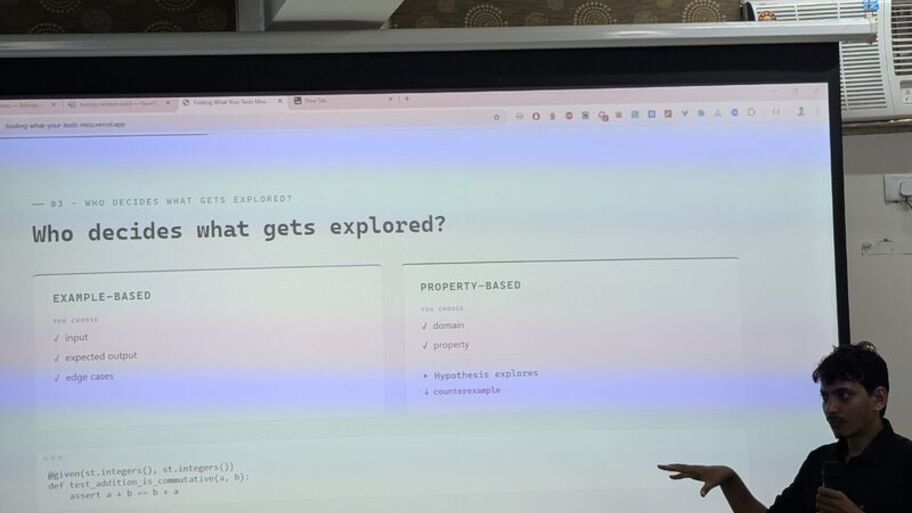
Yesterday was one of those moments where I found myself in a room full of developers and was probably the only tester there.
I was speaking about Property-Based Testing with Hypothesis at the SciPy...
24 Aug

There is a little house that I have been drawing since I was a kid.
It has appeared in countless drawing copies over the years, usually with the same basic shape, the same roof, and probably a tree...
17 Aug
On the 15th of January 2026 myself and Ujjwal Kumar Singh joined a call and pressed record. We were curious to see what would happen. A few weeks later I’d done the same with Neil Taylor and Clare ...
6 Jul
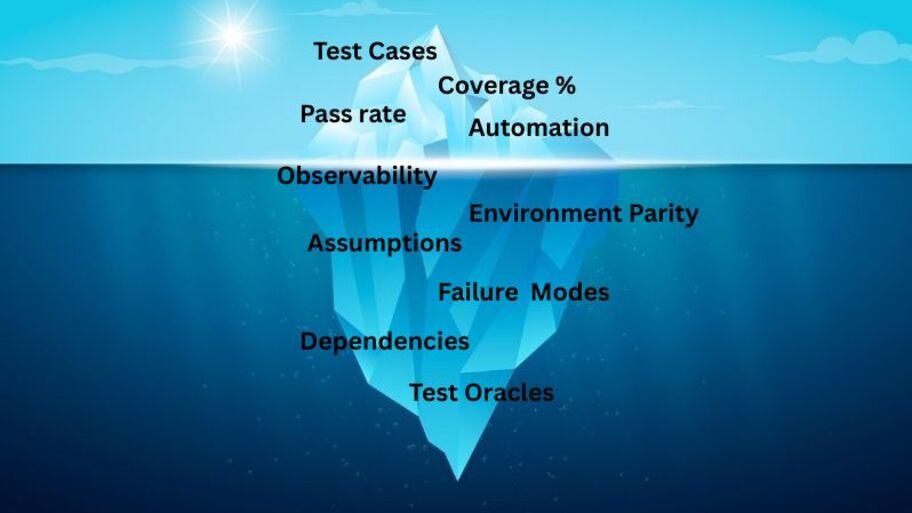
When I look at this iceberg, I see my own journey as a tester.
For a long time, I spent most of my attention on what was visible above the surface. Test cases, coverage percentages, pass rate...
2 Jul

Browsers keep four different pictures of your page at once, and automation bugs live in the gap between them.
9 Jul

Generative AI apps and integrations are growing fast and so are the injection attacks. This time it's through harmless-looking plain text, aka prompts.
27 May

A community-led episode on job hunting, scaling quality engineering, authentic career growth, AI adoption, gaming, and the value of staying connected when the industry feels noisy or uncertain.
20 Jul

Swap your team’s favourite quality superstitions, laugh at cursed demos and disappearing bugs, and turn “don’t deploy on Fridays” from folklore into smarter release habits.
13 Feb
Inference
Inference is the process of using a trained machine learning model to produce an output from new input data. In simple terms, training is where a model learns patterns, while inference is where the trained model applies what it has learned to make a prediction, classification, ranking, or generate content.
For example, when an AI model receives a prompt and generates a response, the generation process is inference. The same applies when an image model classifies an image, a recommendation system ranks products, or a fraud model predicts whether a transaction is suspicious.
From a testing perspective, inference is where the model's learned behaviour becomes observable and testable. Testing can examine output quality and accuracy, consistency, error handling, latency, throughput, and resource consumption across different inputs and operating conditions.
Inference testing becomes more challenging for generative and probabilistic models because identical inputs may produce different outputs depending on factors such as random seeds, sampling settings, model versions, and context. Tests may therefore need to evaluate properties and acceptable behaviour rather than rely entirely on exact expected outputs.
Inference also exposes distribution shift: production inputs may differ significantly from the data used during training or evaluation. For example, a fraud detection model may encounter transaction patterns that were rare or absent in its training data, causing its performance to degrade without any change to the model itself. Ongoing monitoring and representative production-like test data can help detect this behaviour.
A related risk is training-serving skew, where differences between the data processing or environment used during training and the one used during inference cause the model to behave differently in production. Differences in feature transformations, preprocessing, dependencies, or input formats can introduce this problem.
Performance is another important part of inference testing. Factors such as model size, input length, batch size, hardware, quantisation, and concurrency can affect latency, throughput, and resource usage. Online inference typically prioritises response-time objectives, while batch inference may place greater emphasis on throughput and processing efficiency.
A model that performs well during evaluation may still behave differently when exposed to real-world inputs and production conditions. Inference testing therefore needs to consider not just model accuracy, but also how the model behaves with changing data, workloads, dependencies, and operating environments.
Hallucinations
Hallucinations are outputs generated by an AI system that appear plausible or confident but contain information that is false, unsupported, or not grounded in the available evidence. They can range from small factual errors to completely fabricated facts, sources, references, or explanations.
Hallucinations are particularly challenging because an incorrect response can look convincing and may be expressed with the same confidence as a correct answer. The model can produce a coherent response without having reliable evidence for the claims being made.
Whether a hallucination is a defect depends on the intended use of the system. Fabricated information is generally undesirable in factual question-answering, decision-support, or RAG systems, but invented content may be acceptable or even expected in creative writing, brainstorming, or other open-ended applications.
Hallucinations are sometimes described as intrinsic, where the output contradicts the provided source or context, or extrinsic, where the output makes claims that cannot be verified against the available source or context. This distinction is particularly useful when testing systems that rely on retrieved information.
From a testing perspective, hallucinations cannot always be evaluated with simple exact-match assertions. Testers may need to assess whether responses are factually accurate, grounded in available evidence, complete, and appropriately uncertain when information is unavailable. Testing can include known-answer datasets, source-grounding checks, adversarial and ambiguous prompts, repeated runs, and comparison against trusted sources.
For RAG systems, testing should verify not only whether relevant documents were retrieved, but whether the generated claims are actually supported by those documents. A system can retrieve the correct information and still produce a hallucinated or unsupported answer.
Hallucinations can also change with model versions, prompts, sampling settings, and context. A response that was correct in one configuration may become unsupported in another, making regression testing and confidence calibration important.
A useful testing question is not simply “Did the model answer the question?”, but “Are the claims appropriate for the intended use, and can they be supported by reliable evidence?
Fine-Tuning
Fine-tuning is the process of taking a pre-trained machine learning model and training it further on a smaller, task- or domain-specific dataset so that it performs better for a particular purpose. Unlike training a model from scratch, fine-tuning starts with an existing model that has already learned general patterns.
Fine-tuning can adapt a model to specific behaviours, terminology, writing styles, domains, or tasks. It is commonly used with language, vision, and other generative models where the base model already provides general capabilities but needs additional training for a particular use case.
From a testing perspective, fine-tuning introduces a key challenge: improving performance on the target task does not necessarily mean the overall model has improved. A fine-tuned model may perform better on expected examples while becoming worse on edge cases, unrelated tasks, or behaviours that previously worked well.
This regression of previously learned capabilities is sometimes referred to as catastrophic forgetting. A model can therefore improve locally while regressing globally. Testing should compare the fine-tuned model against a retained and versioned base model using a fixed evaluation set that covers both the target task and existing capabilities.
Testers should evaluate accuracy, consistency, robustness, safety, bias, and regression across expected and unexpected inputs rather than focusing only on examples similar to the fine-tuning data. Changes in behaviour outside the target domain are particularly important because they may not be visible in task-specific evaluation.
Fine-tuning can also introduce overfitting, where the model becomes too closely adapted to its training examples and performs poorly on new inputs. Data quality matters as well: biased, incorrect, duplicated, or poorly labelled training data can become reflected in the model's behaviour.
Fine-tuning can also weaken safety behaviours or guardrails established in the base model, even when the fine-tuning data itself is not unsafe. Safety testing should therefore cover the model's broader behaviour, not just its intended domain.
A fine-tuned model can appear significantly better in its target area while silently losing capabilities elsewhere. A useful testing question is not simply “Did fine-tuning improve the target task?”, but “What changed across the model's behaviour, and what might have regressed as a result?”
Embeddings
Embeddings are numerical representations of data that capture meaningful relationships between items such as text, images, audio, or code. Similar items are represented by vectors that are closer together in an embedding space, allowing systems to compare and find relationships between data mathematically.
Embeddings are commonly used for semantic search, recommendations, clustering, retrieval-augmented generation (RAG), and classification. For example, two pieces of text can use different words but have similar meanings, and their embeddings may still be close to each other.
From a testing perspective, embeddings introduce a different challenge because there is rarely a single correct vector or exact expected value. Testing focuses more on whether similar inputs remain meaningfully close, unrelated inputs remain sufficiently separated, and small changes to input do not cause unexpected changes in relationships. The choice of distance or similarity measure can also affect how these relationships are interpreted.
Testers can evaluate embeddings using similarity measures, representative datasets, nearest-neighbour checks, clustering behaviour, and task-specific evaluation. Testing should consider sensitivity to spelling, language, formatting, domain-specific terminology, and changes to the embedding model.
Embeddings from different models or model versions are generally not directly comparable, even when they have the same dimensions. This can create silent failures in systems that store vectors over time. For example, upgrading an embedding model without re-embedding existing data can reduce retrieval quality in a RAG system while the underlying application continues to appear functional.
Testers should also consider whether embeddings encode unwanted bias from their training data, such as associating unrelated concepts based on historical or cultural patterns.
An embedding model can produce technically valid vectors while still producing poor results for the application using them. A useful testing question is therefore not simply “Is the embedding correct?”, but “Does the embedding preserve the relationships the system depends on?”
Diffusion Models
Diffusion models are a class of generative machine learning models that create new content by learning to reverse a gradual noise-adding process. They are commonly used to generate images, audio, video, and other forms of content.
During training, the model learns how content changes as noise is progressively added. During generation, it works in the opposite direction, starting with random noise and repeatedly removing it until a meaningful output is produced.
From a testing perspective, diffusion models introduce challenges that differ from traditional deterministic software. Their behaviour is stochastic, meaning that unless the random seed is fixed, the same prompt can produce different outputs across runs. Even with a fixed seed, changes to the model version, sampling settings, or execution environment can affect the result. Seed control can therefore support reproducible regression testing, while varied seeds can help explore the range of possible outputs.
Testers may assess output quality, consistency, robustness, safety, bias, and adherence to the input. These can be evaluated through approaches such as metamorphic testing, statistical evaluation, automated similarity metrics, and human evaluation.
Testing should also consider risks such as training-data memorisation, privacy or copyright exposure, adversarial inputs, prompt manipulation, and resource consumption. Performance testing is particularly relevant because generation quality, inference time, and computational cost can change significantly with factors such as output resolution and the number of denoising steps.
A diffusion model can produce an output that looks convincing while still being incorrect, unsafe, biased, or unexpectedly different from previous results. Testing therefore needs to evaluate not only whether an output was produced, but whether the behaviour and output are appropriate for the intended use.
Comments
(29)
Why Quality teams are built on character, not just skills
It was a really great article from you, Gary.
Thank you to the MoTaverse Community
Congrats Gary...
Community Beyond Technology
Wow...
What my first 10k taught me about showing up in the MoTaverse
Congrats 💜
Call for Insights turns 45
It feels great to be part of something amazing.
Teaching the agent to hunt: why execution alone will never produce exploratory testing
(shiftsync.tricentis.com)
28 Sep
We Keep Patching Test Automation. Should We Rebuild & Reinvent It Instead?
(chathuranga.space)
11 Aug
Self-Healing Tests with AI: Triage Before Repair
(www.awesome-testing.com)
11 Aug
Stop Asking AI for Test Cases: Building a Gate-Controlled SDET Prompt
(ujjwalkumarsingh.substack.com)
28 Jul




Not registered for any upcoming events
Thanks for your contribution
Featured on Spotlight As Selenium Active Contributors
Community Star
9 days ago
Thanks for your contribution
Why Your Transition to Quality Engineering May Fail
Community Star
17 days ago
Thanks for your contribution
Friday evening for a tester when weekend plans meet a build release
Community Star
17 days ago
Thanks for your contribution
When Tester is commited to Testing but AI Tools looks more fascinating.
Community Star
17 days ago
